
SparkReceipt Review 2026: AI Receipt Scanner Plans Priced
What SparkReceipt's Pro and Elite plans cost for one user and a small team, how the shared document cap and credits work, two price changes in a year, and three alternatives.

SparkReceipt is a good, cheap receipt scanner for a sole trader or a small team, and most buyers need Pro unless they scan more than 50 documents a month. On its pricing page, checked November 10, 2026, Pro costs $69 a year ($5.75 a month) or $6.90 billed monthly, and Elite costs $129 a year ($10.75 a month) or $12.90 monthly.
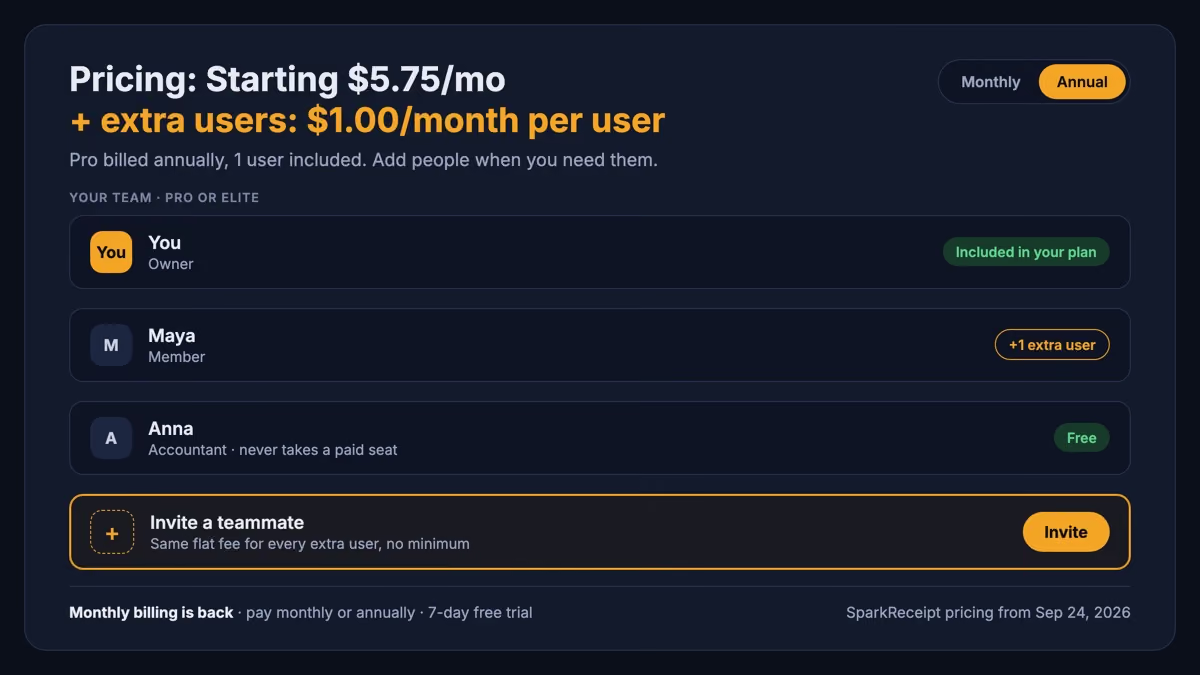
Each extra user is $1.00 a month on either plan, and your accountant joins free. The catch is Pro's limit: 50 documents a month for the whole account, shared by every user, with bank statements counting toward it.
Key factsBest for: Sole traders and small teams who want cheap AI receipt and…
- AI receipt scanner with bank statement matching, inbox import and mileage, priced per account with cheap extra users.
- Plans: Pro and Elite, each with one user included, plus a founder-led setup package on annual billing
- Extra users: A flat fee per user on both plans; your accountant joins free
- Document limit: Pro shares 50 documents a month across the account; Elite is unlimited under fair use
- Free trial: 7 days on Pro and Elite; no free plan on the current price list
Pros
- Extra users cost a flat $1 a month, and accountants join free.
- Bank statement extraction and receipt matching are on both plans.
- QuickBooks Online, Xero, Zapier and Make integrations on Pro.
Cons
- Pro's 50 documents a month are shared by the whole account, statements included.
- No free plan since the 2026 price changes, only a 7-day trial.
SparkReceipt is an AI receipt scanner and expense tracker for small business owners and side hustlers. You photograph a receipt, forward it from your inbox or upload a bank statement, and it reads the vendor, amount, tax and category, matches receipts to bank lines and exports the result to QuickBooks Online, Xero or a spreadsheet. It is built as a cheap layer next to accounting software, or a stand-in for owners who do not run any.
This review is for a freelancer, sole trader or bookkeeper choosing between SparkReceipt's two plans and its rivals. It covers what each plan costs on yearly and monthly billing, what a small team pays, how documents and credits are metered, how the price changed twice in a year and which three tools to compare. Prices come from SparkReceipt's pricing page and its September 2026 pricing note, read on November 10, 2026. Scan accuracy is not scored here.
Toolradar data: of the 90 expense management tools in the catalog of Toolradar, the software directory we run, 44% have a free plan, as of November 5, 2026 (SparkReceipt on Toolradar). SparkReceipt is not one of them any more, so the 7-day trial is the only no-cost way to judge it.
What is SparkReceipt?
SparkReceipt captures documents four ways: the phone app for paper receipts, mass upload of up to 100 files at once, automatic scanning of a connected Gmail, Outlook or IMAP inbox, and bank or card statements in PDF, Excel or CSV. The AI extracts each transaction and matches it to receipts already stored, which is the job a bookkeeper otherwise does by hand at month end.
Around that sit a mileage tracker with per diem, expense claims with approval, an AI assistant called SparkAgent or your own AI over MCP, and integrations with QuickBooks Online, Xero, Zapier, Make and Pabbly. It supports 190 currencies and keeps receipts for at least 10 years. For a US sole proprietor, Elite's Schedule C export is the feature that turns a year of receipts into a tax-ready summary.
How SparkReceipt works
Users are cheap and flat. Each plan includes one user, and every extra user costs the same small fee on Pro and Elite, with no minimum. Your accountant gets free read access and never takes a paid seat, so a business owner and bookkeeper pair pays for one person.
Pro's document cap is per account, not per user. The 50 documents a month on Pro cover receipts, invoices and bank statements for everyone on the account. A five-person team on Pro shares the same 50, which is why teams that scan daily should price Elite, where documents are unlimited under fair use.
Credits meter the heavy jobs. Plans bought on the website include 100 credits per user a month on Pro and 200 on Elite, reset on the first of each month with no rollover. A bank statement uses 1 credit per transaction, past emails beyond the first 10,000 use 0.3 credits each, and every document over Pro's 50 costs 10 credits. Extra packs start at $12.00 for 1,000 credits and never expire.
Buy on the website, not in the app. The pricing FAQ says subscriptions bought through the iPhone or Android app are billed by Apple or Google at their own store prices, which differ from the website, and the bundled monthly credits apply to website plans.
SparkReceipt key features
SparkReceipt pricing
All prices were read on November 10, 2026 on SparkReceipt's pricing page, which says they took effect on September 24, 2026, apply to website subscriptions and exclude VAT or GST. Rival prices come from each vendor's own pricing page on the same day.
A solo user pays $69 a year on Pro or $129 on Elite with yearly billing. Paying monthly for 12 months costs $82.80 on Pro and $154.80 on Elite, our arithmetic, so yearly billing saves about a sixth. For a team of five, the page prints $117 a year on Pro and $177 on Elite, which shows how little extra users add.
Overage on Pro is cheap but real. A document over Pro's 50 costs 10 credits, which at the 1,000-credit pack price is about 12 cents, our arithmetic. A business that regularly scans 70 or 80 documents a month should compare that small overage against the jump to Elite, which costs $60 more a year for one user.
The price changed twice in a year. A November 14, 2025 snapshot of the pricing page showed a free plan with 15 AI scans a month, Pro at $5.75 per seat per month billed annually and Elite at $8.25 per seat. A July 6, 2026 snapshot showed only Elite, at $199.98 a year plus $58 a year per additional user. The September 2026 note says annual-only billing ran from May to September and that existing subscribers keep their price. For a team of three or more, today's Elite costs less than either earlier Elite price, our arithmetic; a solo Elite user, though, pays more than in 2025, and the free plan is gone. Price moves like these reach 34,000+ Finpresso readers first; subscribe free.
| Plan | Price | Best for |
|---|---|---|
| Pro | $69/yr ($5.75/mo) billed annually, or $6.90 billed monthly | 1 user, 50 documents a month per account, one inbox, one live bank feed, 100 credits per user, mileage, QuickBooks and Xero sync |
| Elite | $129/yr ($10.75/mo) billed annually, or $12.90 billed monthly | Unlimited documents under fair use, line-item extraction, several inboxes and bank feeds, AI Fields and rules, Schedule C export |
| Extra user | $1.00/user/mo, or $12/user/yr on annual billing | Same fee on Pro and Elite with no minimum; your accountant joins free |
| Founder-led setup | $529 today, then the Elite yearly rate | Elite plus a 60-minute setup session with the co-founder and one follow-up; annual only, no free trial |
| Extra credits | From $12.00 per 1,000 credits | For bank statement backlogs and large email imports; bigger packs cost up to 30% less per credit and never expire |
SparkReceipt pros and cons
What we like
- Extra users cost a flat $1 a month, and accountants join free.
- Bank statement extraction and receipt matching are on both plans.
- QuickBooks Online, Xero, Zapier and Make integrations on Pro.
What could be better
- Pro's 50 documents a month are shared by the whole account, statements included.
- No free plan since the 2026 price changes, only a 7-day trial.
Who SparkReceipt is for
SparkReceipt fits sole traders, freelancers and owner-run businesses with up to a handful of staff who want receipts, bank statements and mileage in one cheap tool, and who hand the result to an accountant or to QuickBooks Online or Xero. US sole proprietors filing Schedule C get the most from Elite.
Look elsewhere if you want someone else to process paper, where Shoeboxed mails you an envelope, or if you are an accounting firm handling many clients, where Dext is built for practices. Businesses already on Xero should check Hubdoc first, and owners who want full bookkeeping rather than a receipt layer should read the Wave review.
Best SparkReceipt alternatives
If SparkReceipt is not the right fit, these are the closest options.
| Tool | Best for | Starts at | |
|---|---|---|---|
| SparkReceipt | Sole traders and small teams who want cheap AI receipt and bank statement capture | PRO $6.90/mo per user · ELITE $12.90/mo per user · custom-priced plans | Visit → |
| Shoeboxed | Owners who want to mail paper receipts away rather than photograph them | Starter $9/mo · Pro $29/mo · Plus $79/mo | Visit → |
| Hubdoc | Xero users who want bills, statements and receipts fetched into their ledger | $12/mo after a 30-day free trial, no credit card required | Visit → |
| Wave | Owners who want full bookkeeping and invoicing with receipt capture included | Free plan · Pro $19/mo · Wave Advisors $149/mo · Wave Advisors (Starti | Visit → |


The bottom line
SparkReceipt is the cheapest credible receipt and bank statement tool in this comparison for a sole trader, and its flat user fee makes it cheap for small teams too. Start on Pro with yearly billing if you scan under 50 documents a month; move to Elite when the shared cap pinches or you need line items and the Schedule C export. Use the 7-day trial on a real month of receipts and statements, and subscribe on the website rather than in the app.
Compare the field in best receipt scanner apps and AI for expense management, and read Dext vs Hubdoc if you work in Xero or QuickBooks. For mileage, see mileage tracker apps; for the ledger itself, QuickBooks Online pricing, the Xero review and how to do bookkeeping for a small business. Toolradar profiles Shoeboxed, Dext and Wave.
Methodology: prices, limits and terms were read on November 10, 2026 on SparkReceipt's pricing page and its September 2026 pricing note, and on the pricing pages of Shoeboxed, Hubdoc and Wave. Past prices come from dated Wayback Machine copies of SparkReceipt's own pricing page. Totals are our arithmetic on printed prices, before tax. No rating on this page is our own.
This page is general information, not personalized financial or tax advice. Confirm current pricing and what your accountant needs with each provider before you subscribe.
Cite this: Finpresso, 'SparkReceipt Review 2026: AI Receipt Scanner Plans Priced', November 2026.
Frequently asked questions
Is SparkReceipt a good receipt scanner for a small business in 2026?
Which SparkReceipt plan do I need, Pro or Elite?
How much does SparkReceipt cost?
Does SparkReceipt have a free plan?
Can I get a refund from SparkReceipt?
Sources
Prices and plan details come from each vendor's own pricing page, re-checked by the Toolradar pricing tracker.
- Shoeboxed pricingchecked Sep 2026
Some offers on this page may be paid placements or contain affiliate links.
Get the Finpresso brief
Free daily newsletter, read in 5 minutes.
Subscribe free